

User Access Reviews (Access Certifications): Why They Fail and How to Fix Them

- In large organizations, User Access Reviews (UARs) often fail to remove unnecessary access because reviewers lack the context needed to make confident decisions.
- Rapid SaaS adoption, frequent role changes, and fragmented ownership make it difficult to understand who truly needs access and why.
- Timing can be a problem as well: Periodic reviews alone cannot keep pace with fast-changing permissions in modern environments.
- Modern IGA solutions need to treat User Access Reviews as part of a broader identity risk management strategy that combines automation, context, and remediation. This approach provides clear ownership and governance that operates continuously rather than only at review time.
Introduction
As identity-based breaches continue to rise and access misuse becomes a primary attack path, organizations rely on User Access Reviews (UARs) to answer two seemingly simple questions: Who can access what, and should they still be able to?
In theory, this is where stale access should be caught. In reality, it often slips by unnoticed.
Consider a common scenario: A sales operations manager moves into a revenue analytics role. Months later, during a quarterly access review, their new manager is asked to approve continued access to Salesforce admin permissions, Snowflake read access, and a legacy CRM role labeled “SalesOps_Admin_v2.” Faced with dozens of similar decisions, tight deadlines, and little context, the manager approves everything. The review is completed on time. The access persists.
As a result, risk compounds quietly. If an attacker later compromises the account, those lingering admin permissions provide a direct path into sensitive systems, and the activity may appear legitimate because the access was formally approved. By the time unusual behavior is detected, the damage may already be done, hidden behind what looks like valid access.
This article takes a closer look at what User Access Reviews are, why they often fail in enterprise environments, and what actually improves them, including how teams can evolve beyond periodic certification to continuous identity governance.
What Are User Access Reviews and Why Do Organizations Use Them?
User Access Reviews, sometimes referred to as Access Certifications, are formal review processes used to confirm that individuals retain the right level of access to systems, applications, and data.
In modern environments, access needs change constantly. People join teams, move roles, take on short-term projects, and leave. Systems are added, deprecated, or reconfigured. Without a mechanism to revisit access decisions, privileges tend to accumulate.
UARs counter that drift before it turns into persistent risk, making them a key control for security and compliance programs. Security teams rely on them to reduce unnecessary access, regulators expect them, and auditors ask for evidence.
But UARs are much more than box-checking exercises: They’re crucial for combatting the consequences of outdated/over-permissive access, which include an increased blast radius, lateral movement opportunities, and data exposure. Left unchecked, excessive access can also undermine segregation of duties, increase the likelihood of insider misuse, and complicate incident response when permissions are overly broad or poorly documented.
What Do You Actually Review During a UAR?
On a technical level, a User Access Review usually evaluates three core elements:
- First, the user or identity. This may include employees, contractors, service accounts, or other non-human identities. Reviewers need to understand who the identity represents and their current role.
- Second, the application or system. This could be a SaaS tool like Jira or Workday, a cloud service such as AWS, or an internal application. Each system has its own access model and risk profile.
- Third, the entitlements or permissions. These are certain roles, groups, or privileges granted, such as “Jira Project Admin,” “AWS IAM PowerUser,” or “NetSuite AP Clerk.”
A typical review asks an approver to confirm whether each combination of user, system, and entitlement is still required. Teams often formalize this process using a standardized User Access Review checklist to ensure reviews are consistent across systems.
How Are UARs Usually Run?
Most organizations run User Access Reviews as periodic campaigns on a quarterly, semiannual, or annual basis. Security or identity teams first collect access data from identity providers, SaaS applications, and cloud platforms. The data is grouped by user or application and routed to managers, application owners, or both, depending on the organization’s review model.
In manager-led reviews, line managers are asked to certify all access for their direct reports. In application-owner models, system owners validate entitlements for all users of their application. Two-tier approaches combine both, often starting with the manager and escalating higher-risk access to application owners.
In many enterprises, these reviews are still driven by spreadsheets exported from systems that are then emailed to reviewers, tracked manually, and reconciled at the end of the cycle. Evidence is archived for audit purposes.
This model made sense when environments were smaller and change was slower. Today, it struggles to keep up.

Why Do User Access Reviews Break Down in Practice?
In most enterprises, access reviews fail not because teams ignore them but because the process buckles when it meets real-world complexity.
Specifically, ineffective UARs are defined by a lack of context, unclear ownership, a “rubber-stamping” mentality, suboptimal evidence collection, and a lack of real-time coverage.
Why Is There So Little Context in Reviews?
The most common UAR failure mode is a lack of context. Reviewers are asked to make decisions without understanding what the access enables.
A manager reviewing access for an engineer might see roles like “AWS_ReadOnly,” “AWS_PowerUser,” and “CustomPolicy_ProdOps.” Without visibility into what those roles allow or how they are used, the safest path becomes approval.
Who Actually Owns Access Decisions?
Ownership ambiguity compounds UAR's other failure points. In many enterprises, it’s unclear who is accountable for access: managers, application owners, or security teams. This can lead to access decisions that are delayed, inconsistently applied, or approved without meaningful inspection.
Manager-only reviews are common, but managers may not understand application-specific permissions. App-owner reviews improve technical accuracy, but app owners may not know whether access matches a user’s role.
Organizations that require approval from both the manager and the application owner improve coverage but also increase friction and review fatigue.
Why Do Reviews Turn Into Rubber Stamping?
Faced with long lists and tight deadlines, many reviewers default to approving everything. After all, reviewers are rarely rewarded for revoking access, but they are penalized socially or operationally when revocations cause disruption. Over time, this creates a culture in which UARs are seen as a compliance chore rather than a security control.
What Makes Evidence Collection So Hard?
Collecting access data across SaaS, cloud, and on-prem systems is difficult. Entitlements change. Integrations fail. Access lists go stale before reviews start. This means data is often inaccurate, incomplete, or inconsistently labeled.
Inaccuracies can be introduced downstream as well. After the review, teams must package evidence for auditors: who reviewed what, when decisions were made, and what actions were taken. In spreadsheet-driven workflows, this is a manual and error-prone process.
Why Is the Security Value So Short-Lived?
Even when reviews are completed carefully and on time, their impact fades quickly in dynamic environments. As we’ve seen, access changes every day as people switch roles, join new projects, or gain temporary permissions that are never revisited.
By the time a quarterly or annual review is finished, parts of it are already outdated. New access has been granted, old access has lingered, and the risk profile has shifted. The end result? Point-in-time reviews reassure auditors but only provide limited, short-lived protection for the organization.
What Actually Improves UARs?
For many teams, improving reviews means rethinking the tools they rely on. Modern User Access Review software shouldn’t just collect approvals; it should help reviewers understand risk, usage, and context in a single place. This is how organizations can start to automate User Access Reviews without sacrificing decision quality.
To understand the difference robust tooling makes, let’s walk through the principles that actually improve reviews:
- Full Context: In a mature enterprise UAR cycle, access data is normalized across SaaS, cloud, and internal systems so reviewers aren’t working from fragmented exports. A manager reviewing an engineer’s access can see their current role, recent access usage, and whether permissions are common for peers in similar roles. For high-risk systems, application owners are brought in when technical judgment is required.
- Iterative Improvements: When revocations happen, they aren’t treated as one-off cleanups. They become signals. If multiple users lose the same entitlement, that role definition is likely too broad. If access lingers after role changes, joiner-mover-leaver workflows need to be adjusted. Over time, this feedback loop reduces review volume and improves the quality of upstream access.
- Cross-Team Alignment: Security and business teams need a common understanding of what access means and why it matters. Without that shared understanding, reviews become mechanical exercises rather than informed risk decisions.
Taken as a whole, these patterns explain why minor process tweaks tend to have limited impact. Real improvement comes from an approach that scales as the organization evolves.
How Does Linx Security Approach User Access Reviews?
Linx Security treats UARs as an integral part of continuous identity management, shifting teams from reactive certifications to proactive risk reduction.
Here’s how:
- Holistic Coverage: Linx is designed to secure every type of identity, both human and non-human: With Linx, enterprises manage employees, service accounts, automation, and AI agents.
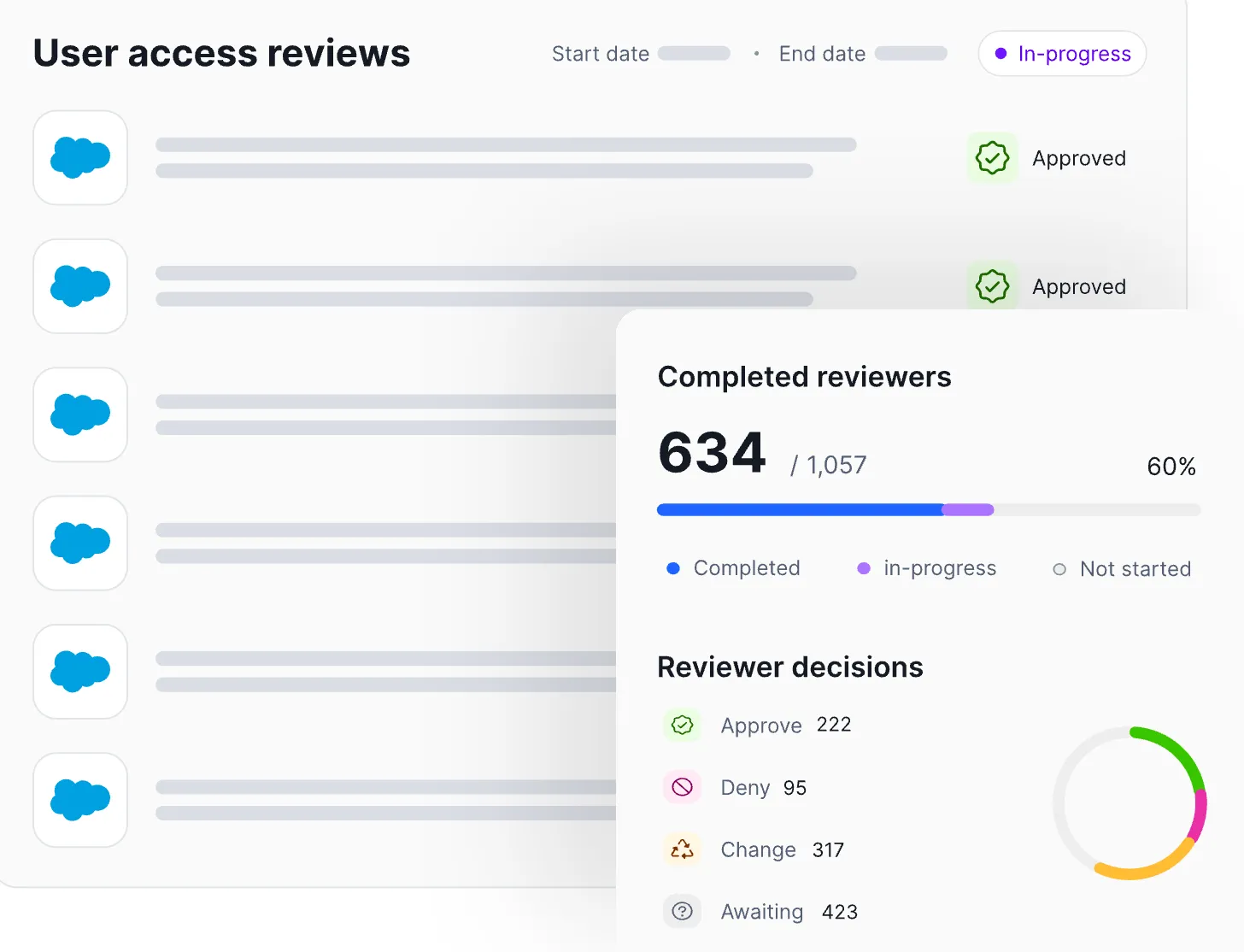
- Automation: Linx automates governance processes to decrease operational burden. For example, Linx can automatically remove or revoke access once a reviewer approves the change, ensuring that decisions made during the review process are executed immediately and consistently across connected systems. Workflows, tracking, and evidence collection are automated end to end. Review decisions are logged as they happen, creating audit-ready evidence by default.
- Context From a Single Pane of Glass: Reviewers see identity attributes, role context, access usage, and risk signals together, guiding smart access decisions.
How Are Linx UARs Intelligent?
Most review processes treat all access the same, regardless of risk or usage. Linx starts from the opposite premise: Not all permissions matter equally.
Linx replaces access lists with clear recommendations that help reviewers focus on decisions that actually reduce risk (such as identifying unused admin roles or access that violates least-privilege expectations).
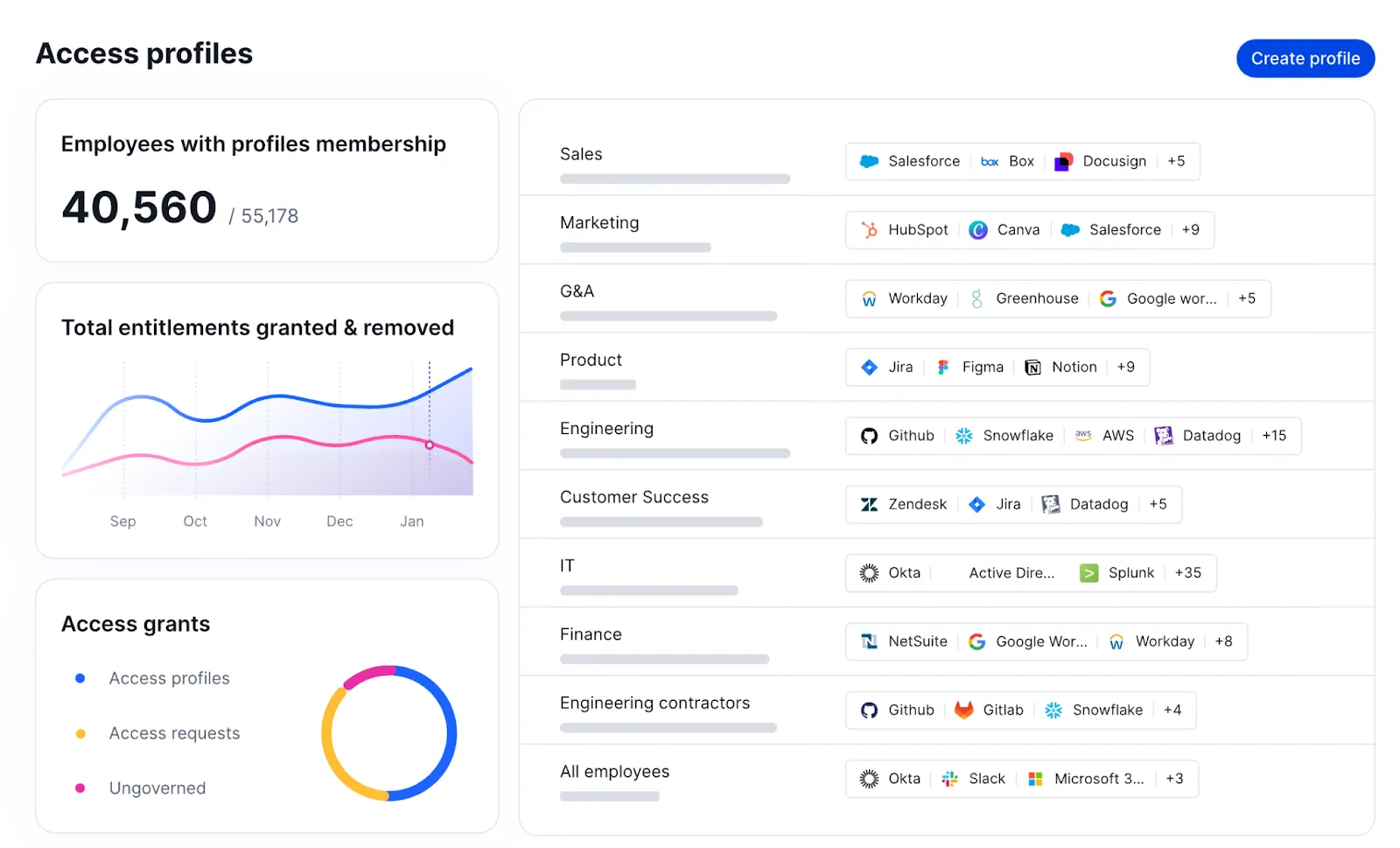
Access profiles in Linx group related permissions together so reviewers can evaluate access at the profile level rather than reviewing many individual entitlements:
What Does Continuous Governance Look Like?
Continuous governance shifts the role of access reviews. Rather than serving as the primary control, reviews act as a validation step on top of ongoing monitoring and remediation.
“Ongoing” is the key word here. Linx continuously monitors access as it changes. Rather than letting risk accumulate until the next scheduled certification cycle, Linx flags risky access combinations, unused privileges, and newly elevated roles in real time.
The Linx MCP Server exposes governance actions through policy-driven automation interfaces, allowing identity teams and automated tools to remove excessive or outdated permissions when they no longer align with role expectations or governance policies.
The main takeaway? Linx empowers teams to remediate issues immediately or queue them for review, instead of only uncovering them during a scheduled review months later.
In practice, this means UARs become shorter, more targeted, and easier to defend. Auditors still get clear certification records, but those records are backed by continuous monitoring and remediation, not last-minute cleanup.
Conclusion
As environments grow more complex and identity becomes the primary security perimeter, point-in-time certifications alone are no longer enough. Organizations that rely solely on periodic reviews will continue to struggle with rubber stamping, incomplete context, and access that drifts out of alignment with real-world roles. The best IGA solutions, like Linx, automate access reviews and provide real-time visibility and governance.
The path forward isn’t eliminating UARs. It’s strengthening them with context, automation, and continuous oversight so reviews become informed validation checkpoints rather than large-scale cleanup exercises. To test your UAR readiness, Checkout our user access review checklist.
If you want to see how continuous identity governance changes the equation, request a demo to experience Linx’s approach to User Access Reviews.
What's next?