
Identity Governance for Financial Software

Identity governance for humans, service accounts, and agents
Linx finds every employee, service account, and AI agent across all systems, gives each one an owner, and replaces spreadsheet access reviews with audit-ready evidence. Live in weeks, with no professional services.
Green check mark icon
Surfaced 2,000 service accounts and 148 stale passwords at a market intelligence software company
Green check mark icon
Found 340 active orphaned accounts and 44 dormant ones, the oldest unused for 1,400 days at a financial SaaS platform
Green check mark icon
Found hundreds of dormant accounts across a 21-year Active Directory estate at an anti-fraud software company
Green check mark icon
Governs org-wide AI agent adoption at monday.com, where any employee can spin up their own agent
Green check mark icon
Saved 600 hours on access reviews for SmartCentres
See Linx in your environment
30 minutes: see your service accounts, AI agents, and orphaned accounts, all handled in Linx.
Simple illustration of an orange flower with yellow stamens and a green stem.

“Using Linx fixed identity issues that have plagued us for 15 years.”

Headshot of Pieter Vaniperen
Pieter Vaniperen
CISO, AlphaSense
cloud
Green hills with a gradient fade to white below against a black background.Green hills with a gradient fade to white below against a black background.

Every identity governed, from engineers to service accounts to agents

Know every service account and AI agent, and who owns it

Linx connects all identities from all systems on one identity graph, correlating each service account and agent to a human owner.

Black check mark icon
Built-in findings for inactive service accounts, service accounts with admin access, stale passwords, and app registrations with no owner
Black check mark icon
AI suggests an owner for unowned service accounts, and flags the account when that owner leaves
Black check mark icon
See each AI agent’s owner, tool permissions, and the other agents it calls, then allow or block its tool calls in real time with the MCP Gateway
Proof

A market intelligence software company couldn’t say how many service accounts it had. Linx counted about 2,000 alongside 3,149 employees, and flagged 148 stale passwords with an owner tied to each.
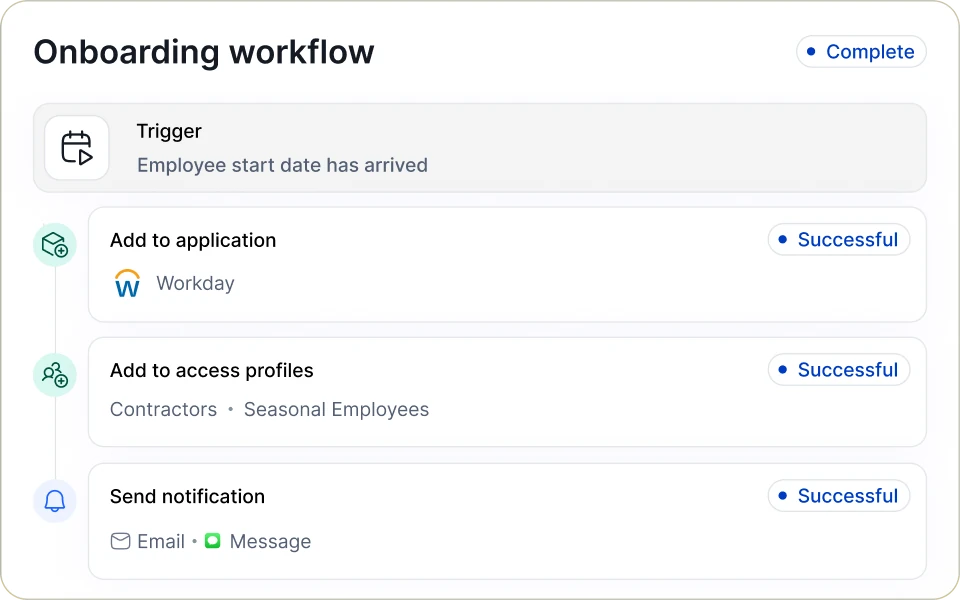
Linx onboarding workflow marked Complete: a trigger when the employee start date arrives, then Add to application (Workday), Add to access profiles (Contractors, Seasonal Employees) and Send notification (Email, Message), each marked Successful.
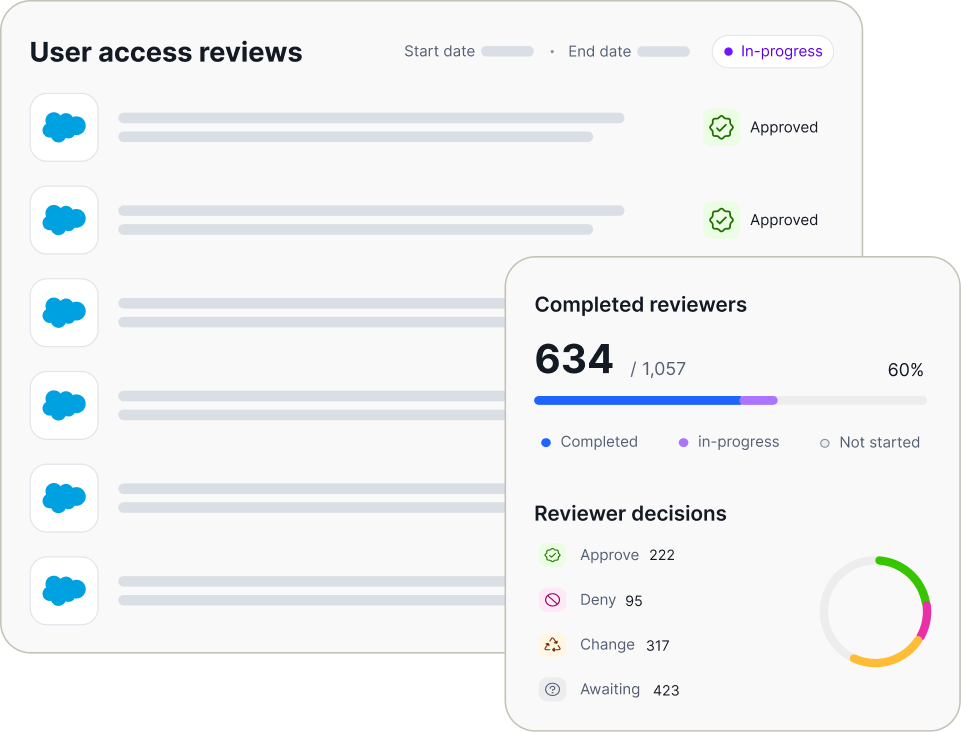
Dashboard displaying user access reviews with several entries marked approved and a sidebar showing 634 out of 1,057 reviewers completed, indicating 60% progress, with reviewer decisions: 222 approve, 95 deny, 317 change, and 423 awaiting, accompanied by a progress bar and a pie chart.

Access reviews that end in real decisions, not rubber stamps

Linx AI compares every user and permission against peers with the same job title and department, then tells reviewers what to approve, what to revoke, and why.

Black check mark icon
Plain-language descriptions for cryptic entitlements like svc-data-platform-role-4
Black check mark icon
Reviews scoped by app or entitlement, including reviews of only people who changed roles, or only access granted directly in an app
Black check mark icon
Timestamped PDF and Excel evidence for SOC 2, ISO 27001, and PCI audits, plus monitoring of new admin access between reviews
Proof

A SaaS platform for financial companies previously ran access reviews from a spreadsheet across over 400 apps, despite having an IGA tool. With Linx, they have streamlined and automated their entire access review process.

Standing access becomes the exception

Linx replaces permanent admin rights with just-in-time access that expires on its own. Requests are approved by policy, or by AI with written reasoning.

Black check mark icon
Eligibility based on HR attributes and group membership, with MFA and risk checks before anything is granted
Black check mark icon
Access is revoked automatically at expiry, directly in the source system
Proof

An authentication software company had “no path to zero-standing-privilege.” In its first weeks with Linx, AWS admin access moved to auto-approved JIT, and Wiz access went to a named approver. Both expire automatically and are removed in the source system.
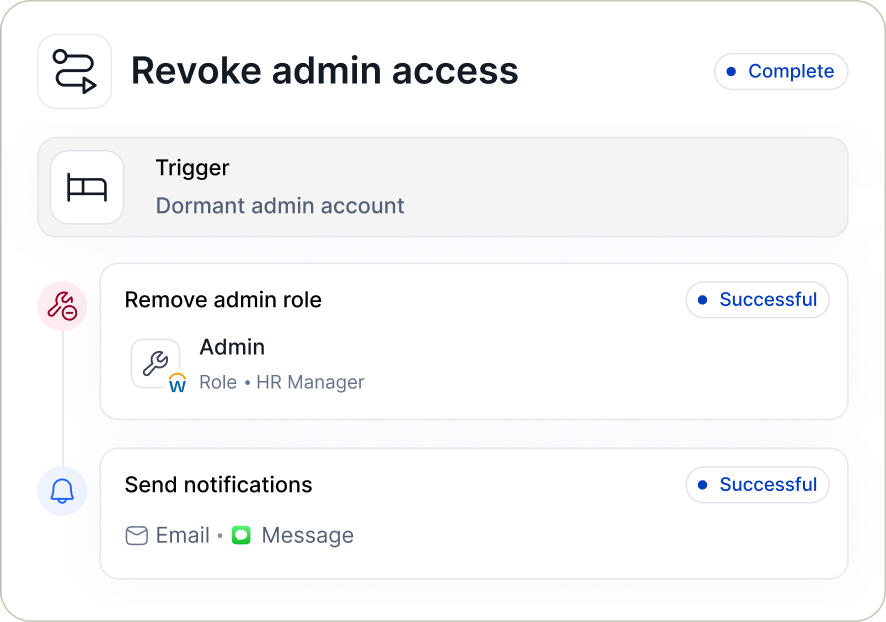
User interface for revoking admin access showing a completed workflow triggered by a dormant admin account, including successful removal of the admin role for HR Manager and successful sending of notification via email and message.

See what’s sitting in your directory

Live in weeks, without hiring a new identity team

01
Connected nodes icon

Connect

Connect your HR system, Entra, Active Directory, and SaaS apps in read-only mode. Nothing changes until you say so.

02
Eye icon

See

See your full service account inventory, orphaned and dormant accounts, partially offboarded users, and service accounts with admin access on day one, with no configuration.

03
Circular arrows icon

Automate

Automate onboarding, offboarding, your first access review, and just-in-time access for your most sensitive groups once you trust the data.

More for financial software IT and security teams

Governing AI Agent Access at Software Companies Serving Financial Services
AI Access Control

How to Govern AI Agent Access at Software Companies Serving Financial Services

Sep 25, 2026
Identity Security & Governance for Financial Software
Solution

Identity Security & Governance for Financial Software

Achieve modernizes identity governance across hundreds of apps with Linx cover
Customer Story

Achieve modernizes identity governance across hundreds of apps with Linx

Feb 18, 2026

FAQs

How does Linx find service accounts and figure out who owns them?

Linx finds service accounts by connecting your IdP, HR, cloud, and app data on one identity graph, then matching each account to a human owner, even when no owner was ever recorded. When an owner leaves, Linx flags the account, and a workflow can reassign it or open a ticket.

Can Linx govern AI agents?

Linx governs AI agents by discovering them as their own identity type, separate from service accounts, with an owner, system prompt, tool permissions, and the other agents each one calls. The Linx MCP Gateway checks every agent tool call in real time, blocks what policy doesn’t allow, requires human approval for destructive actions, and logs every decision.

We already run an MCP gateway. Does Linx replace it?

Linx can replace or work alongside an existing MCP gateway. It acts as the policy decision point, so your gateway can allow or block agent actions based on who owns the agent and what that person is allowed to do.

Will our auditors accept access review evidence from Linx?

Linx access review evidence is used by large enterprises in highly regulated industries. It supports the access control requirements in SOC 2, ISO 27001, and PCI DSS audits. Each review exports as a timestamped PDF or Excel report showing every account, entitlement, reviewer, and decision, and actions can open Jira or Linear tickets so the record also lives in your ticketing system.

Is AI-assisted access review just faster rubber-stamping?

AI-assisted access review in Linx is not rubber-stamping, because every recommendation comes with written reasoning based on peer access, and a human makes the final call. Linx also writes plain-language descriptions for cryptic entitlements, so reviewers know what they’re approving.

Can Linx find accounts that aren’t connected to our IdP?

Linx finds accounts outside your IdP by connecting directly to SaaS, cloud, and on-prem apps, and by using AI to ingest flat files when there’s no API. That’s how it catches users who were deactivated in Okta but are still active in downstream apps.

We already bought an IGA tool that never delivered. Why would Linx be different?

Linx is built to deliver value in weeks, without the professional services that legacy IGA deployments depend on. Linx doesn’t sell professional services at all. Many teams start by connecting Linx in read-only mode next to their current tool, then move offboarding, access reviews, and service account governance over once they trust the data.

Does Linx charge for every service account and AI agent?

Linx is licensed per human identity, so governing your service accounts and AI agents doesn’t increase your license cost as those populations grow.

How long does it take to deploy Linx, and do we need an identity team?

Linx typically deploys in weeks and doesn’t require a dedicated identity team. It’s built for IT, security, and GRC staff who manage access alongside their other work. You start in read-only mode, built-in findings appear on day one, and nothing changes until you say so.

Illustration of leaves with an orange flower and a blue flower growing along a hillside.
Orange and yellow decorative flower illustrationBlue decorative flower illustration

Ready before your next audit cycle starts?

Book my demo