
Identity Governance for Mortgage & Consumer Lending

Govern the contractors, service accounts, and others your HRIS can’t see
Linx automates onboarding, offboarding, and access reviews across your HR system, Active Directory, and cloud apps. Govern employees, contractors, service accounts, and agents alike. Live in weeks, with no professional services.
Green check mark icon
Catch terminated users who still have access, and revoke access across every connected system automatically
Green check mark icon
Govern contractors and other non-employees, even when your HR system has no record of them
Green check mark icon
Give every service account an owner, and reassign it automatically when that owner leaves
Green check mark icon
Give reviewers plain-English context, so access reviews stop being rubber stamped
See Linx in your environment
30 minutes: see terminated users who still have access, unowned service accounts, and contractors outside your HRIS.
Simple illustration of an orange flower with yellow stamens and a green stem.

Customer Stories

“Linx gives you unlimited workflows and unlimited integration. And we have over 314 plus applications that we needed to integrate. With the workflows, we wanted to be able to streamline our whole onboarding, offboarding process. Linx gives us the ability to do that.”


Headshot of Brian
Brian Miller
Sr Director GRC & Identity Engineering, Achieve
cloud
Green hills with a gradient fade to white below against a black background.Green hills with a gradient fade to white below against a black background.

Every identity governed, from contractors and brokers to service accounts and agents

Offboarding you can prove

Linx links your HRIS, IdP, and app-local accounts to one person, flags terminated users who still have access, and revokes stale access automatically.

Black check mark icon
Detects partially-offboarded users out of the box, with no configuration
Black check mark icon
Access profiles cover onboarding, role changes, and offboarding in one place
Black check mark icon
Workflows remediate orphaned and dormant accounts automatically
Proof

“With the workflows, we wanted to be able to streamline our whole onboarding, offboarding process. Linx gives us the capability to do that.” — Brian Miller, Senior Director of GRC and Identity Engineering, Achieve
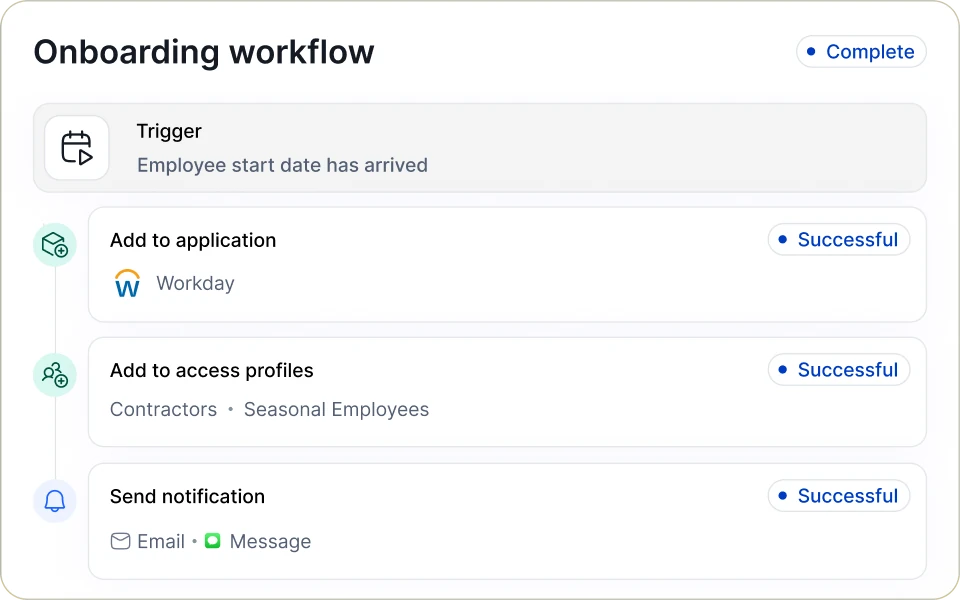
Linx onboarding workflow marked Complete: a trigger when the employee start date arrives, then Add to application (Workday), Add to access profiles (Contractors, Seasonal Employees) and Send notification (Email, Message), each marked Successful.
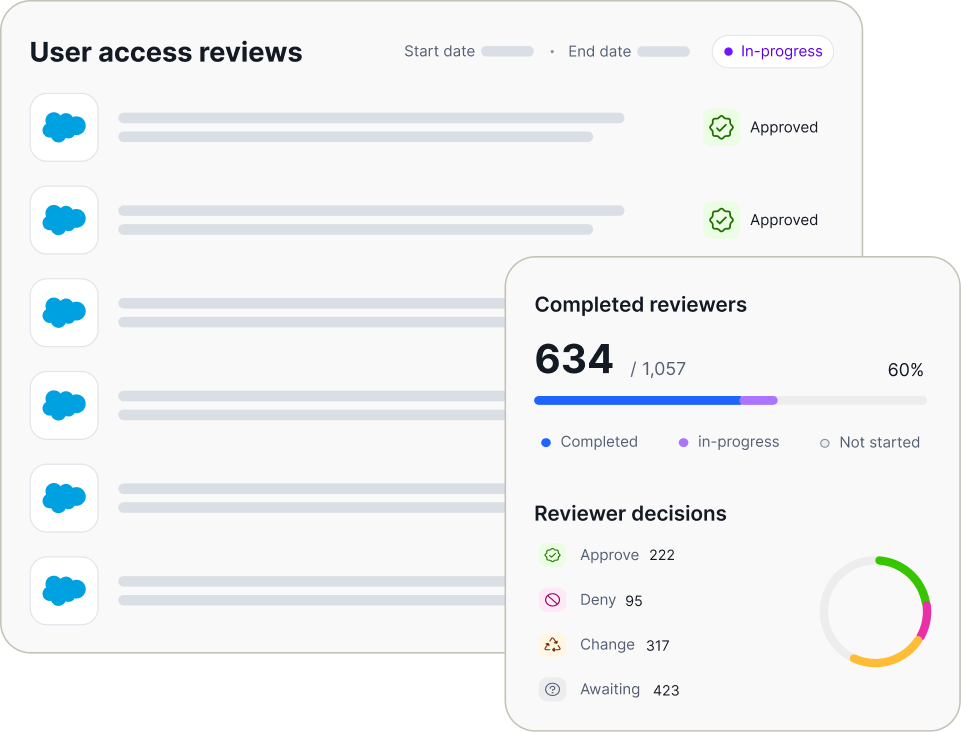
Dashboard displaying user access reviews with several entries marked approved and a sidebar showing 634 out of 1,057 reviewers completed, indicating 60% progress, with reviewer decisions: 222 approve, 95 deny, 317 change, and 423 awaiting, accompanied by a progress bar and a pie chart.

Contractors, brokers, and agents governed

Linx treats your identity provider and Active Directory as authoritative sources alongside HR, so contractors, brokers, and agents get an owner, an end date, and reliable offboarding, even when the HRIS can’t see them.

Black check mark icon
Governs contractors, offshore teams, and branch staff wherever they live: your identity provider, an AD OU, or a custom attribute
Black check mark icon
Flags every contractor without an owner or an end date, so offboarding no longer depends on someone remembering
Black check mark icon
Keeps access right when people convert between employee and contractor, in either direction
Proof

A national consumer lender only ever created contractors in Okta, never in HR. Linx now reads their status from Okta, so the team no longer uploads HR spreadsheets by hand.

Tie service accounts to an owner

Linx discovers and classifies every service account across cloud, SaaS, and your directory, and links each one to a human owner.

Black check mark icon
Correlate all service accounts and agents to a human owner using the identity graph
Black check mark icon
Reassign ownership automatically when an owner leaves
Proof

With Linx, a national consumer lender found orphaned accounts across Datadog, Salesforce, and Slack, a problem for both audits and license costs.
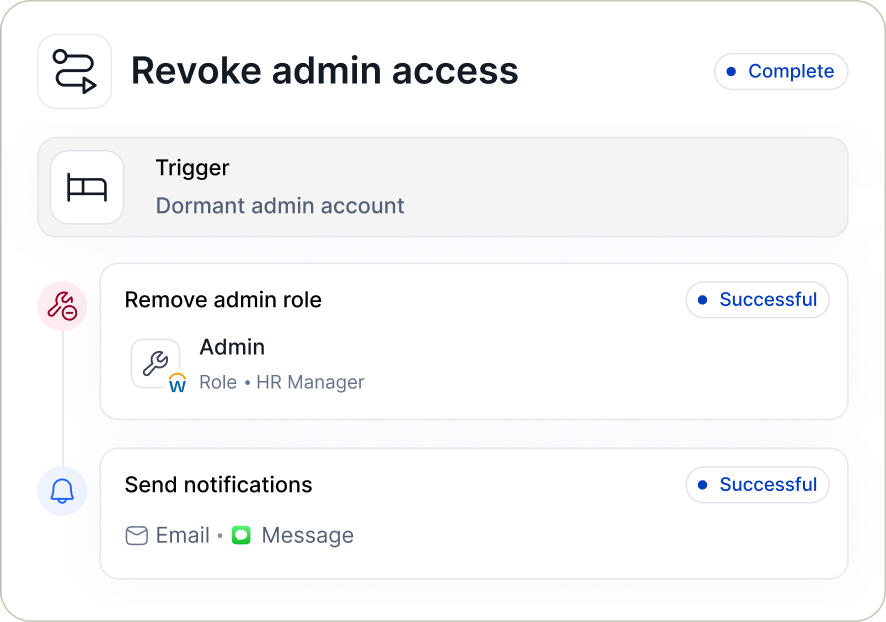
User interface for revoking admin access showing a completed workflow triggered by a dormant admin account, including successful removal of the admin role for HR Manager and successful sending of notification via email and message.

See what’s sitting in your directory

Live in weeks, with no developer and no professional services

01
Connected nodes icon

Connect

Connect your HR system, IdP, and Active Directory in read-only mode. Nothing changes until you say so.

02
Eye icon

See

See terminated users who still have access, unowned service accounts, and dormant accounts on day one, with no configuration.

03
Circular arrows icon

Automate

Automate offboarding, contractor lifecycle, and your first access review once you trust the data, with proof for auditors built in.

More for mortgage & consumer lending IT and security teams

Access Governance in Mortgage and Consumer Lending
Identity Governance

The Access Governance Blind Spot in Mortgage and Consumer Lending: Contractors, Brokers, and Agents Your HRIS Never Sees

Oct 2, 2026
Identity Security & Governance for Mortgage & Consumer Finance Companies
Solution

Identity Security & Governance for Mortgage & Consumer Finance Companies

Achieve modernizes identity governance across hundreds of apps with Linx cover
Customer Story

Achieve modernizes identity governance across hundreds of apps with Linx

Feb 18, 2026

FAQs

How does Linx find terminated users who still have access?

Linx finds terminated users who still have access by linking HR, identity provider, and app-local accounts to one person, then flagging anyone HR marks as gone who still has a live account anywhere. This detection runs out of the box with no configuration. When it finds a gap, a workflow can deactivate the remaining accounts, open an ITSM ticket, and notify the manager automatically.

How does Linx verify that offboarding actually removed access?

Linx verifies offboarding by re-checking every connected system after a termination and flagging any account that is still active. Plenty of offboarding automations report success without applying the change. Linx catches those silent failures and keeps a governance log linking each termination to the access that was removed.

How does Linx govern contractors who aren’t in the HR system?

Linx governs contractors who aren’t in the HR system by treating your identity provider and Active Directory as authoritative sources alongside HR. Contractor status can come from an AD OU, an identity provider field, or a custom attribute. Contractors then get the same owner, end date, access reviews, and offboarding as employees.

How does Linx handle service accounts with no owner?

Linx handles service accounts with no owner by discovering and classifying them across cloud, SaaS, and your directory, then flagging any that aren’t tied to a human owner. It can seed classification from naming conventions you already use, like SA- prefixes, and it separates device accounts from real service accounts. When an owner leaves, a workflow reassigns ownership instead of leaving the account orphaned.

Do we need a developer or professional services to run Linx?

Linx does not require an in-house developer or professional services, and Linx doesn’t sell professional services at all. IAM teams of one to five people run Linx across estates of hundreds of applications. Connectors, workflows, and custom rules are configured in the product, and the AI assistant can build custom rules from a plain-language request.

Can Linx replace a legacy IGA tool?

Linx can replace a legacy IGA tool, including deployments that have relied on heavy customization and vendor professional services to keep running. Many teams start by connecting Linx in read-only mode alongside their current tool, then move offboarding, access reviews, and service account governance over once they trust the data.

Does Linx work with on-prem Active Directory?

Linx works with on-prem Active Directory through a lightweight on-prem agent that both reads from and writes back to AD. It also connects natively to Microsoft Entra ID and Okta, including hybrid environments where on-prem AD syncs to Entra.

Is AI-assisted access review safe for regulated financial data?

AI-assisted access review in Linx is built for regulated environments, because every AI recommendation comes with written reasoning and a human reviewer makes the final call. Completed campaigns can’t be edited, so the proof stays auditor-ready. Reports export as PDF or Excel showing each account, entitlement, reviewer, and decision.

How long does it take to deploy Linx?

Linx typically deploys in weeks, not the months or years legacy IGA rollouts can take. One consumer lender’s team was pulling detailed data from a cloud platform within a couple of weeks of connecting it. Teams start in read-only mode, so nothing changes until they’re ready.

Illustration of leaves with an orange flower and a blue flower growing along a hillside.
Orange and yellow decorative flower illustrationBlue decorative flower illustration

Ready before your next audit cycle starts?

See how Linx handles offboarding, contractors, and service accounts nobody owns in your environment.
Book my demo