



- AI agents differ from people and service accounts: they choose their own next steps, act autonomously, and are often ephemeral, so they need to be secured as first-class identities.
- Shadow AI Detection pulls signals from EDR, MDM, CI/CD, and cloud tools to find unsanctioned agents and map who uses them and what they can reach.
- Agent Runtime Control makes Linx the decision point for any AI gateway, allowing or blocking each tool call based on the identity behind it, its risk, and the action.
- Identity teams can now build custom Autopilots for any use case, with defined scopes, human approval rules, and dry runs before going live.
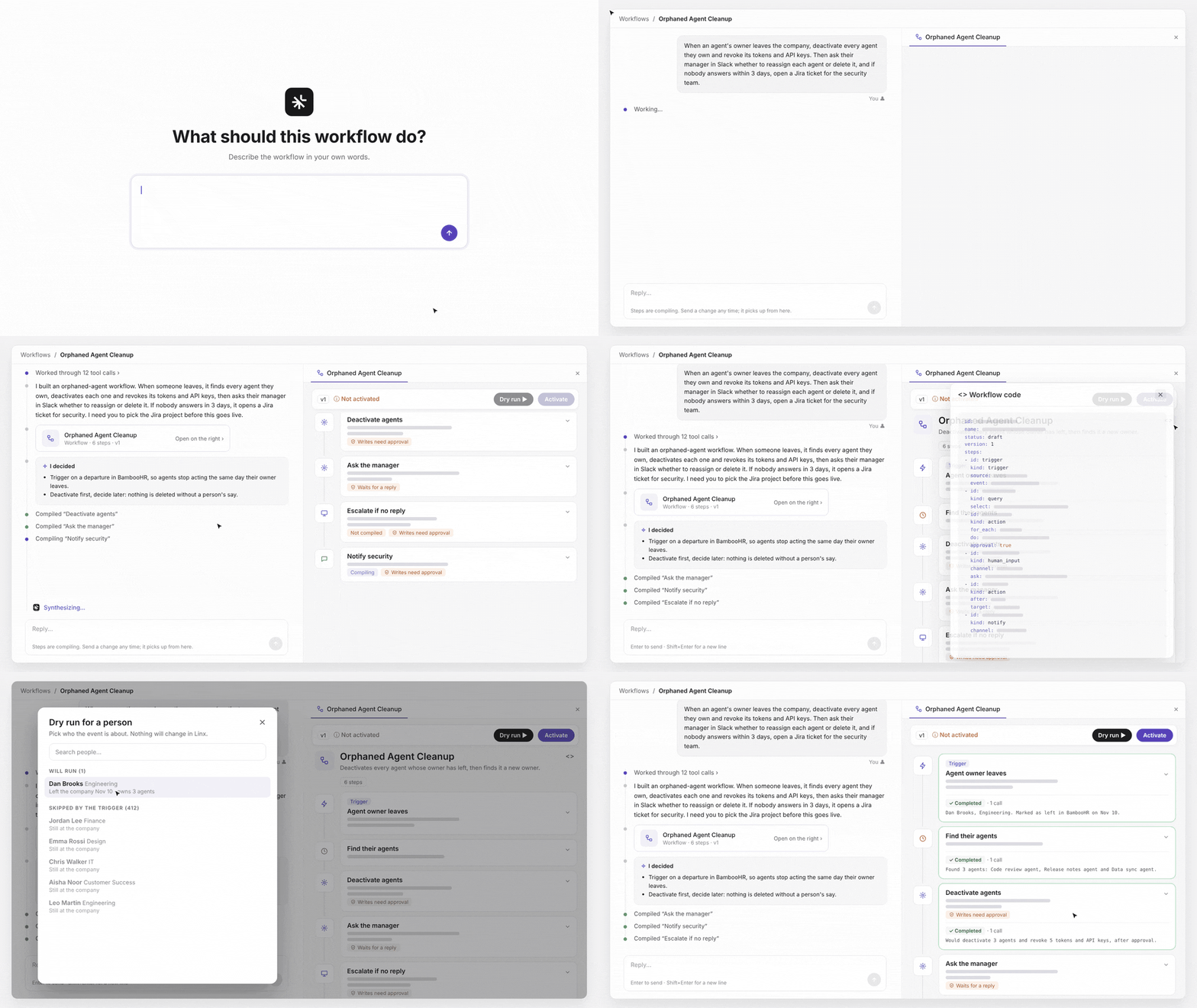
- Prompt-to-Workflow turns a plain-language description into a tested governance workflow, like cleaning up agents whose owner has left.
- All four releases run on the Linx Identity Graph alongside human and NHI identities, so every decision draws on the same context.
AI adoption has outpaced the teams responsible for securing it. Agents now run everywhere, from approved platforms to developers' laptops and pipelines, and many of them nobody has seen. Each one gets access, makes decisions and acts in seconds, often through a gateway that can allow or block a call but doesn't know who is behind it or how risky they are. Without that identity context, teams are left with a blunt choice: allow everything and take the risk, or block everything and slow the business down. And governance still runs on human time: a ticket, an approval, a quarterly review. At the same time, identity teams are expected to govern all of it, on top of every human and NHI, usually without new headcount.
Today we're launching four capabilities that take on both sides of that problem: bringing every agent under identity control, managed or not, in any gateway, and giving identity teams the AI to keep up: agents they build for any use case, and workflows they create just by describing them. Below, we walk through what each one does, how it works and why we built it this way.
Agent security starts with identity
Agents aren't people, and they aren't service accounts either. Three things set them apart:
- Agents run without a script. A service account follows a script. An agent decides its own next step, so what it does next is hard to predict.
- Agents are autonomous. They connect to company tools and data and act on their own, often without anyone reviewing what they can reach.
- Agents are ephemeral. They're spawned, used, renamed, modified, deactivated and reactivated, often with little trace.
Then there's shadow AI agents: the agents nobody sanctioned at all. Coding assistants on personal accounts, agents in pipelines, AI apps with OAuth access to company data. No owner, no review, no record.
The stakes go beyond risk. Gartner predicts that through 2028, over 50% of enterprise AI initiatives will halt due to unresolved agentic identity challenges. Get agent security wrong, and AI projects don't ship.
Our take is simple: Give agents the respect they deserve, secure them as first-class identities. Graph it, so you know who owns it and what it can reach. Decide with context, so every action is judged on risk and policy. Control the action, wherever it happens. That's what Linx already does for humans and NHIs, and it's why 35% of Linx customers already secure agent identities with us, with more than 25,000 governed in production. Today's releases take it further.
What's new
Shadow AI Detection: find the agents nobody told you about
Teams are adopting AI faster than anyone can track. A developer installs a coding assistant, a team wires an agent into a GitHub Actions pipeline, someone connects an AI app to a cloud account. None of it goes through the identity or security team, and most of it leaves only scattered traces. Today, organizations either buy a separate endpoint discovery tool that stops at a list, or lock down devices and block AI altogether. Neither holds up for long.
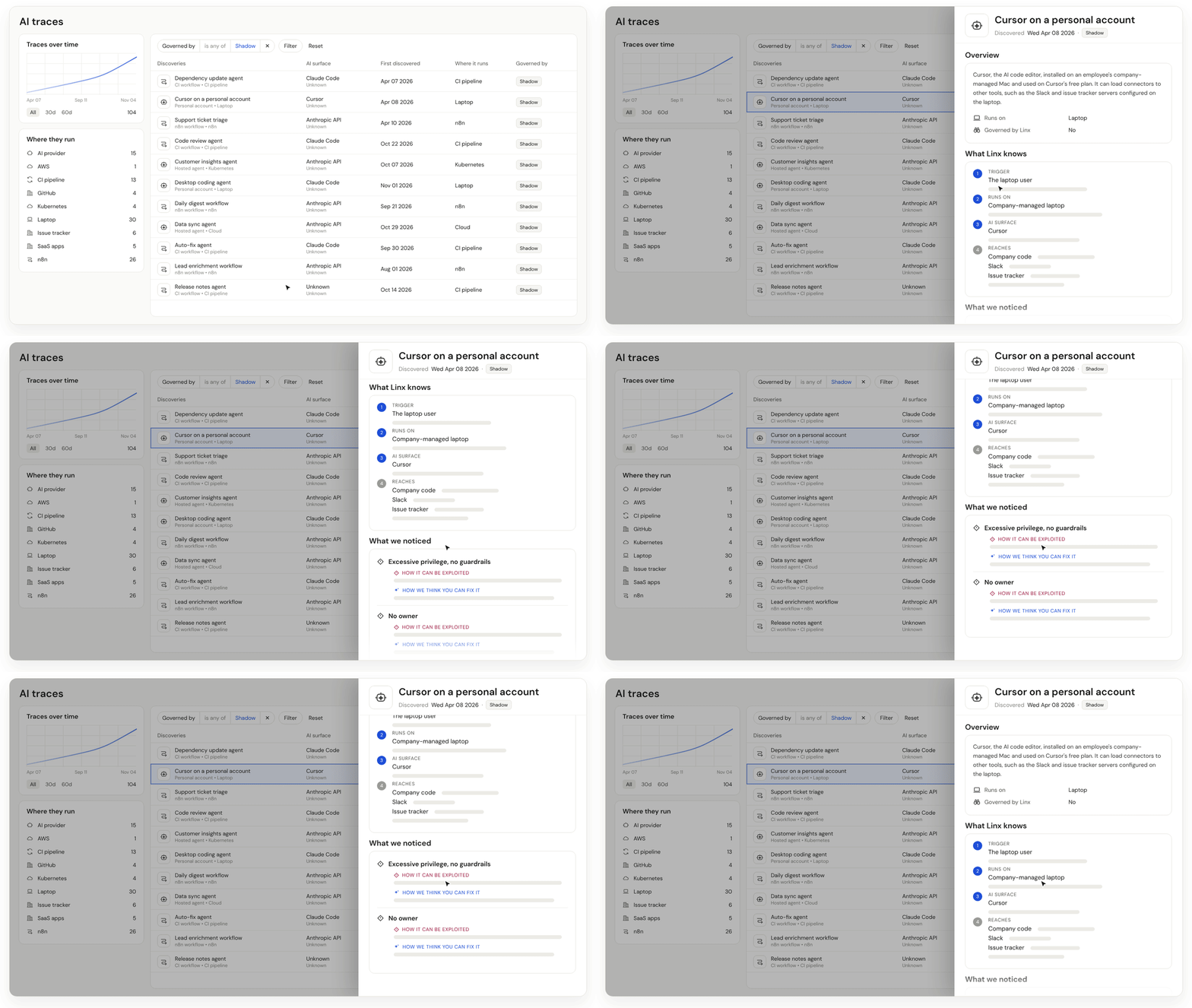
Shadow AI Agents Detection takes a different approach. Linx already inventories the agents on the platforms where they're built. Now it also pulls signals from your EDR and MDM tools, CI/CD pipelines and cloud platforms, and ties those traces together on the Identity Graph into one story: how AI is being used, by whom and with what access. Connect the connectors and Linx finds it automatically. And because every finding lands on the graph, you don't stop at discovery. You can govern and control what you find.
Take a developer using Cursor on a personal account on a company laptop, with company code in reach. Linx shows you who it is, which device, what it can touch and how to close the gap, all in one view.
Agent Runtime Control: a decision on every action, in any gateway
Controlling agents at runtime takes context. Who is the agent acting for? How risky is that identity? What is it actually trying to do? Without those answers, most teams are stuck choosing between two bad options: allow everything and take the risk, or block everything and slow the business down.
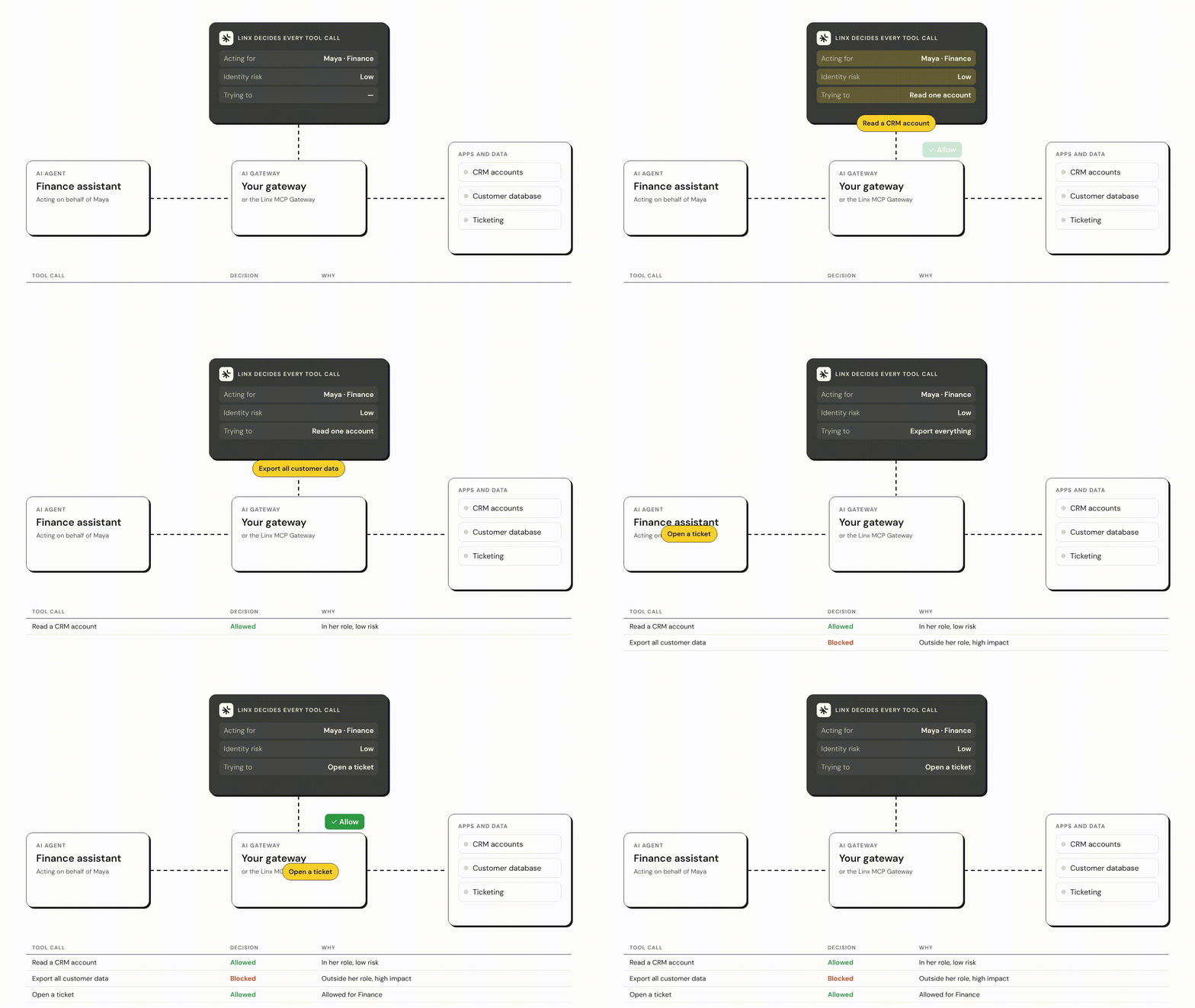
Agent Runtime Control brings that context to the AI gateway you already run. Linx becomes its decision point, allowing or blocking every tool call based on the identity behind it, its risk and what it’s trying to do, and logging every decision for audit. Routine work keeps moving and only the risky actions stop: a finance agent can read a CRM record, but its attempt to export every customer record is blocked. No gateway yet? The Linx MCP Gateway works out of the box.
Here's what that looks like: a finance agent acting for an employee can read a CRM record. When it tries to export every customer record, the call is blocked. Same agent, same person, different action, different decision.
Autopilots for any use case:
Identity teams have more work than they could finish working around the clock: access reviews, cleanup, offboarding, open issues. Today, that work either goes to an outsourced services team or simply doesn't get done. Agents can help, but only if they're both effective and safe. An agent without full identity context isn't effective enough, and one without tight governance isn't secure enough. Linx Autopilots already handle common jobs out of the box. Now you can build your own for any use case, each working like a mission-specific team member, with the full context of the Identity Graph and governance built in.
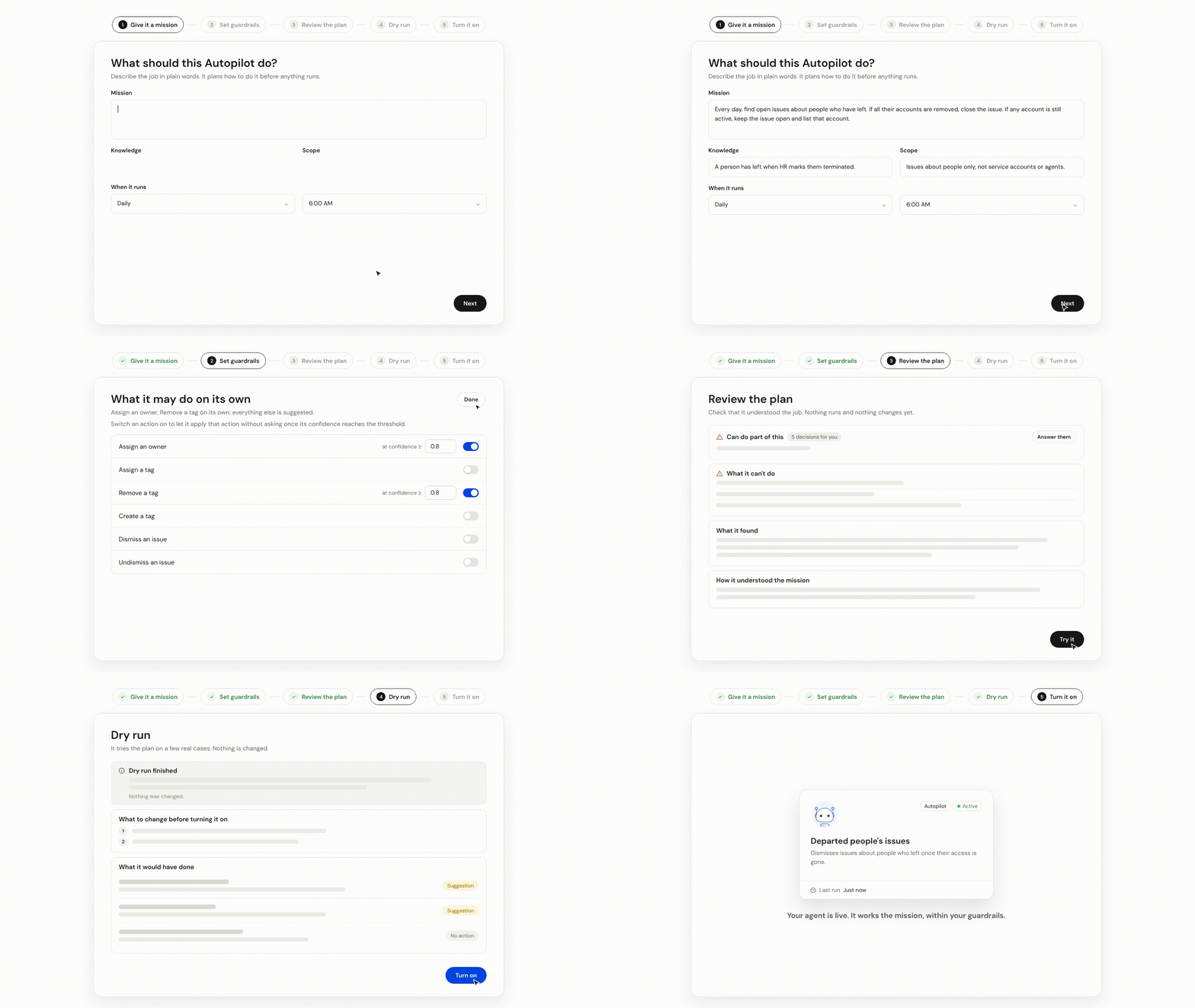
Building one starts with a mission in plain language. The Autopilot works from everything Linx knows about your identities and access, plus any guidance you give it, within a scope you define. You decide which actions it takes on its own, which need human approval and which it never takes, and it weighs risk before it acts. Run it on demand, on a schedule or when something changes in Linx, like a new risk or an access change. Connect it to tools like Slack and Linear and it works like any other member of the team, with every action and investigation logged. Before it goes live, you read its plan and dry-run it on real data.
Prompt-to-Workflow: govern agents by describing the rules
Agents come and go faster than any process built for people. An owner leaves, and their agents keep running with live tokens and keys. A new agent connects to production data, and nobody reviews it. Identity teams know the rules they want to enforce. Building the automation behind them is the hard part, and today that usually means scripts or a separate tool that takes its own expertise to run. Prompt-to-Workflow works the way AI coding tools do: you describe the job, and Linx builds the agentic workflow.
In the example below, an identity team describes what should happen when an agent’s owner leaves the company. Linx asks what it needs to know, builds every step, shows the code behind it and dry-runs the workflow on a real departure, so you see exactly which agents it would touch before anything goes live. Watch it go from a single prompt to a tested workflow.
Better together
Each release stands on its own, but they all draw on the same thing: context. Every agent Shadow AI Detection finds sits on the same Identity Graph as every person and NHI in your organization, with an owner and access you can see. That's the context Agent Runtime Control uses to judge each tool call, and the same context an Autopilot weighs before it acts or a workflow relies on when it runs. The more Linx knows about an identity, the better every decision about it gets, and the more confidently your teams can let the work happen.
All of it runs on one platform, alongside Modern IGA, Identity Security Posture, Just-in-Time Access and Lifecycle, with humans, NHIs and agents on one Identity Graph. Context for every identity. Control over any action
See it live at Gartner IAM
We'll demo all four releases at the Gartner Identity & Access Management Summit in Las Vegas, December 7–9. Book a meeting with our team.
What's next?